

READING THE RESULTS
What it checks
EasyQLab runs 47 checks on every page of every language. Here is each one, grouped by family: what it catches, an example, the severity it gives by default, and what to do when it fires.
How the checks work
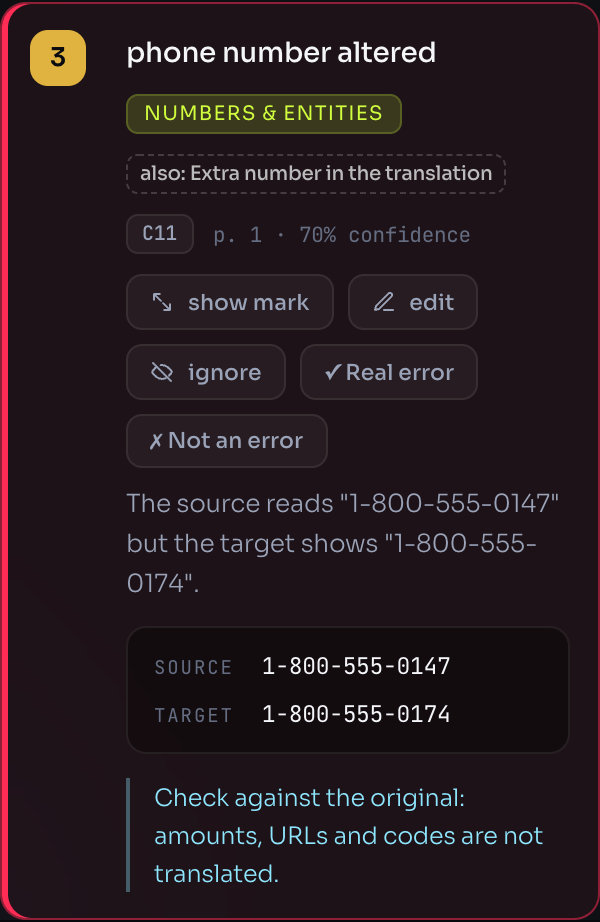
EasyQLab first pairs every paragraph, cell and box of the original with its translation. Then each check compares the pair: text, numbers, format and layout.
Two checks use AI directly: AI review of the translation reads each paragraph against its original, and AI visual review looks at both pages side by side. The rest are rules.
Three checks compare the languages with each other. They only run when the project has three languages or more.
Every finding carries its check code (C11, C39, X1…). You see it on the finding card and in the CSV, so you can trace any mark back to its check. The annotated PDF shows the check’s name instead of its code, because that is what the person fixing the file understands.
When several checks see the same error, it appears once, with the highest severity, and the card says “also:” with the names of the other checks.
What to do when a check fires
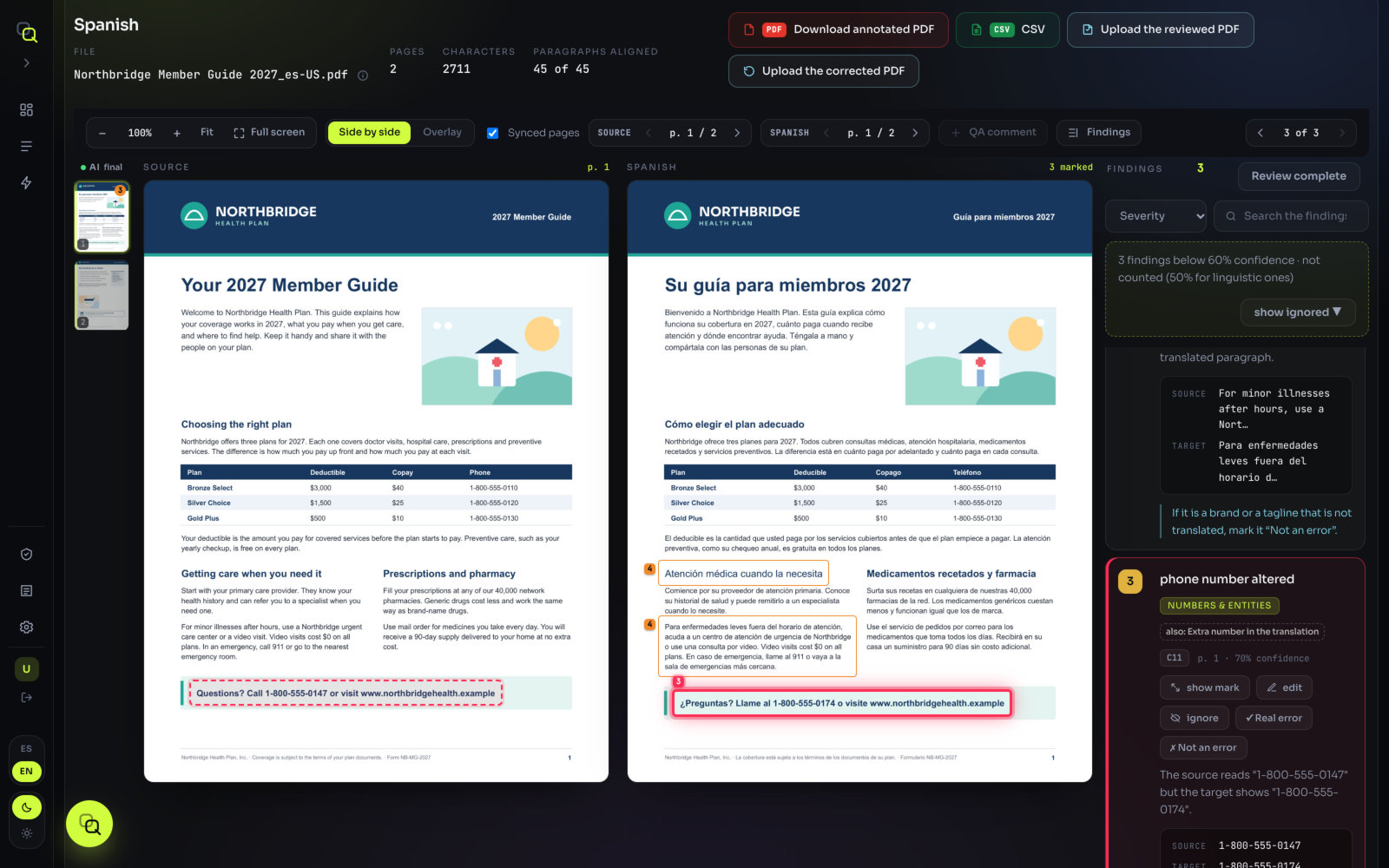
- Click the finding. Both pages jump to it, marked on the original and on the translation.
- Compare the two. The card shows the Source and Target text, and often a hint with what to change.
- Decide. Real error if it needs fixing; Not an error if it is a false alarm; ignore if it is right but doesn’t matter for this delivery. See Deciding.
Severity goes from 1 (acceptable) to 5 (critical). What each level means, and how severities become a verdict, is on The traffic light.
The checks, family by family
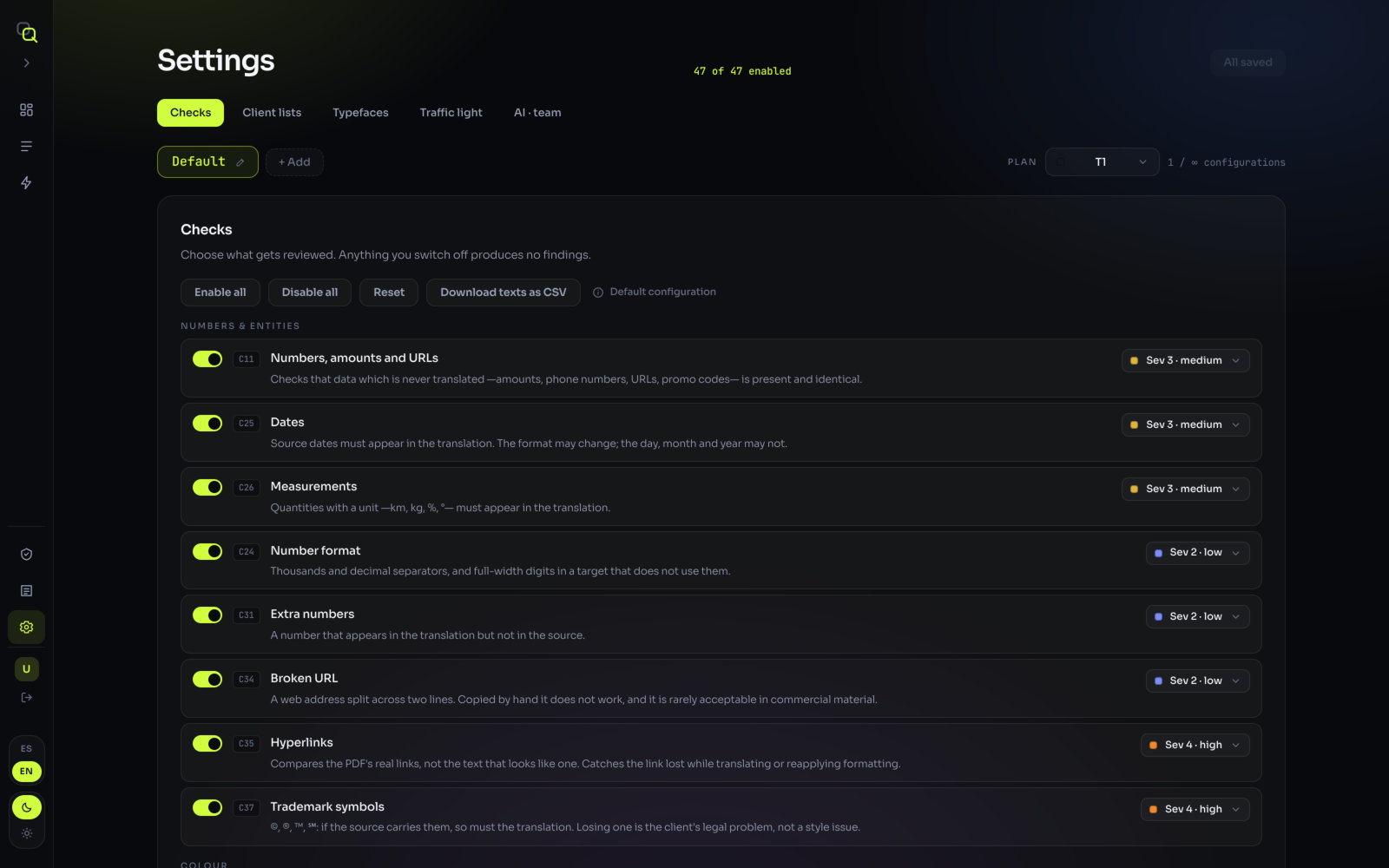
The family names below are the ones the Category filter and Settings use.
Numbers & entities
Data that should come through the translation unchanged.
| Check | What it catches | Example | Sev |
|---|---|---|---|
Numbers, amounts and URLs C11 | An amount, phone number, URL or promo code that is missing or different. | “1-800-555-0100” → “1-800-555-0010” | 3 |
Number format C24 | Thousands and decimal separators that don’t follow the language, and full-width digits where the language doesn’t use them. | “1,000.50” left as is in German | 2 |
Dates C25 | A date whose day, month or year changed. The format may change; the date may not. | “March 3, 2027” → “3 de marzo de 2026” | 3 |
Measurements C26 | A quantity with a unit (km, kg, %, °) missing from the translation. | “25 %” lost from a sentence | 3 |
Extra numbers C31 | A number in the translation that is not in the original. | a “2” that appears from nowhere | 2 |
Broken URL C34 | A web address split across two lines. Copied by hand, it doesn’t work. | “www.example. com/plan” | 2 |
Hyperlinks C35 | A real link in the file that was lost while translating or reapplying formatting. | the email address is no longer clickable | 4 |
Trademark symbols C37 | A ©, ®, ™ or ℠ that the original has and the translation doesn’t. | “Brand®” → “Brand” | 4 |
When it fires: fix the figure in the translation; it should match the original exactly. A trademark symbol is a legal matter for your client, not a style choice.
Colour
| Check | What it catches | Example | Sev |
|---|---|---|---|
Text colour C1 | A paragraph in a different colour from the original, measured as the eye sees it, not by colour codes. | a blue heading turned black | 2 |
Brand colour in vectors C2 | Backgrounds, boxes and rules whose brand colour drifted, often because of the export profile. | the brand background slightly off | 2 |
The card shows both colours as swatches, so you can see the difference instead of reading codes.
Typography
| Check | What it catches | Example | Sev |
|---|---|---|---|
Typefaces and substitutions C3 | A different font family from the original. | a sans-serif body set in a serif | 1 |
Type size C6 | A paragraph whose size falls outside the document’s own scale. | one paragraph much smaller than the rest | 2 |
Size emphasis C33 | A word set larger for emphasis in the original that lost its emphasis. | a big “FREE” set at body size | 1 |
Glyph corruption C38 | A character from a script neither language uses. | a Chinese character inside Spanish text | 3 |
Common false alarms: a language that needs its own font. Add the replacement in Settings → Typefaces (Font equivalences) and it stops raising a finding. See Typefaces.
Styles
| Check | What it catches | Example | Sev |
|---|---|---|---|
Bold C4 | Bold in the original that is missing in the translation. | “Deadline: May 1” → “Fecha límite: 1 de mayo” | 4 |
Italics C5 | The same for italics, except in languages that don’t use them. | a title in italics set upright | 3 |
Initial capitalisation C18 | The original starts with a capital and the translation doesn’t. Not applied to scripts without capitals. | “Call us” → “llámenos” | 2 |
Duplicate words C23 | The same word twice in a row. | “para para” | 3 |
Common false alarms: some scripts are set in a heavier font. When text looks bold only because of the language’s font, Bold reports it at severity 1, as a notice, not as added bold.
Layout
How the text sits on the page.
| Check | What it catches | Example | Sev |
|---|---|---|---|
Margins C8 | Text that spills out of the text area of the original. | a longer line running into the margin | 3 |
Trim area and collisions C9 | Text outside the trim area, or over an image when it isn’t in the original. | a caption sitting on the photo | 4 |
Orphan words C14 | A single word alone on the last line of a paragraph. In Polish, Czech and Slovak, also a one-letter word left at the end of a line (severity 2). | “…a su médico. hoy” | 3 |
Superscript and subscript C36 | A footnote marker or a unit index that dropped to the baseline. | “m²” → “m2” | 3 |
Tables cell by cell C41 | A cell in another column (4), text running out of its cell (3), against its border or a continued table without its header (2). | a price under the wrong column | 4 |
Text that cannot be seen C42 | White on white or text covered by a box or image (5); text cut by a frame edge (4). | a paragraph hidden under a photo | 5 |
Text boxes C45 | Text running out of its box when it fits in the original, and boxes that disappeared. | a call-out box overflowing | 3 |
AI visual review C40 | Looks at both pages like a DTP reviewer: a table that changed, a rule, box or logo missing or added, formatting applied differently, paragraphs glued together, broken words. | the logo is missing from page 2 | 5 |
Common false alarms: in languages with partial support, orphan words and margins depend on line breaking and are only a hint. AI visual review gives each kind of error its own severity; see The traffic light.
Structure
| Check | What it catches | Example | Sev |
|---|---|---|---|
Structure C10 | A paragraph or page that is missing. It tells a real omission apart from text that simply reflowed. | the last bullet of a list is gone | 5 |
Text volume C15 | Much less text than the language normally needs, which suggests something was left out. | a page with half the expected text | 3 |
Punctuation
| Check | What it catches | Example | Sev |
|---|---|---|---|
Punctuation C12 | Brackets, colons, question marks and similar marks the translation lost. | “Questions?” → “Preguntas” | 3 |
Ending punctuation C21 | A paragraph that doesn’t end like the original, allowing for each script’s equivalents. | a sentence without its final full stop | 2 |
Quotes and brackets C22 | Quotes or brackets that don’t add up, or were left unclosed. | “(see page 4” | 3 |
Script-native marks C28 | Latin punctuation in Chinese, Japanese, Arabic or Urdu, which have their own marks. | “,” instead of “,” in Chinese | 3 |
Punctuation sequence C29 | Two marks in a row that weren’t in the original. | “,.” or “..” | 3 |
Spacing
| Check | What it catches | Example | Sev |
|---|---|---|---|
Spacing C13 | Double spaces and spaces before punctuation. | “hoy mismo” · “gracias !” | 2 |
Spacing around data C16 | A figure the original keeps apart from the text, run together in the translation. | “Call800-555” | 2 |
Non-breaking space C20 | A non-breaking space in the original that the translation doesn’t keep. | “10 kg” split across lines | 2 |
Segment (untranslated text)
| Check | What it catches | Example | Sev |
|---|---|---|---|
Untranslated text C17 | A paragraph identical to the original: text left in the source language. Pure data, such as a URL or a phone number, is ignored. | “Learn more about your benefits” left in English | 5 |
Common false alarms: not everything that stays the same is a mistake. A name, an address or legal small print left as in the original is reported at severity 2; a loose phrase left in English, at 4. If it is meant to stay in English, mark it Not an error.
Consistency
| Check | What it catches | Example | Sev |
|---|---|---|---|
Translation consistency C27 | The same text translated two different ways in the same document. | “Member Services” translated two ways | 4 |
Reverse consistency C32 | Two different paragraphs of the original with the same translation, usually a copy-paste onto the wrong paragraph. | two different headings with the same text | 4 |
Length
| Check | What it catches | Example | Sev |
|---|---|---|---|
Paragraph length C19 | A translation much shorter or longer than its original, paragraph by paragraph. It finds the missing half sentence even when the total looks right. | a two-sentence paragraph with one sentence | 3 |
Terminology
| Check | What it catches | Example | Sev |
|---|---|---|---|
Forbidden terms C30 | Words your client doesn’t allow. The list comes from the CSV you upload in Client lists. | a competitor’s product name | 4 |
It only fires if you uploaded a list with prohibido rows. See Client lists.
Linguistic (spelling)
| Check | What it catches | Example | Sev |
|---|---|---|---|
Spelling C44 | Words the language’s dictionary doesn’t know, per variant. | “benefcios” | 2 |
Spelling is checked in Spanish (Spain, US, Mexico), French, Italian, Portuguese (Brazil, Portugal), German (Germany, Switzerland), Russian and Greek. Words also in the original, your client’s brands and glossary, acronyms, codes and proper names are let through.
Translation
| Check | What it catches | Example | Sev |
|---|---|---|---|
AI review of the translation C39 | Reads each paragraph against its original and flags what a reviewer would send back: an omitted or added phrase, a changed figure or title, inverted meaning, a typo, an untranslated fragment, a wrong label, a term that changes within the page. | “does not cover” → “covers” | 5 |
Its severity depends on the kind of error, from 2 for a term to 5 for an omission; the full list is on The traffic light. Its explanation is written in the interface language at the time the page was read. You can hide its findings with Show translation review (N); see The results screen.
Images
| Check | What it catches | Example | Sev |
|---|---|---|---|
Images C7 | An image that is missing, replaced, rescaled or moved. It compares count, content, scale, position and colour space, and tells a re-exported image apart from a different one. | the English screenshot kept in the French file | 2 |
Consensus
These run only with three languages or more. They point at the language that differs from all the others.
| Check | What it catches | Sev |
|---|---|---|
Consensus · colour across languages X1 | One language uses a colour none of the others use. It is almost always a defect. | 4 |
Consensus · typefaces across languages X2 | A font family present in every language but one. | 3 |
Consensus · type size across languages X3 | A file whose body size is far from the rest. | 2 |
Which checks need the PDF
Word, PowerPoint and Excel files are checked on their own. But some checks look at the drawn page, and only a PDF has one. Without a PDF, these 11 checks don’t run:
| Check | Family |
|---|---|
Brand colour in vectors C2 | Colour |
Italics C5 | Styles |
Margins C8 | Layout |
Trim area and collisions C9 | Layout |
Orphan words C14 | Layout |
Size emphasis C33 | Typography |
Broken URL C34 | Numbers & entities |
AI visual review C40 | Layout |
Tables cell by cell C41 | Layout |
Text that cannot be seen C42 | Layout |
Text boxes C45 | Layout |
Without a PDF, Images (C7) only compares how many images there are. If you have both the PDF and the Word or PowerPoint file, upload both. See Files, formats and limits.
What is not checked yet
Grammar, terminology against a glossary, non-translatable terms, and tags or entities from XLIFF files are not checked yet.
A glossary you upload in Client lists is still read as context by the translation review. EasyQLab doesn’t judge style or tone: that stays with your reviewer, who now knows where to look.